guest translation pbxlink
Name Translation
This page allows you to configure how guest names should be formatted when they are sent to the PBX over a PBX link.
The final name string(s) sent to the PBX may be further truncated to fit within the PBX protocol's maximum allowed length and/or may have disallowed characters stripped out.
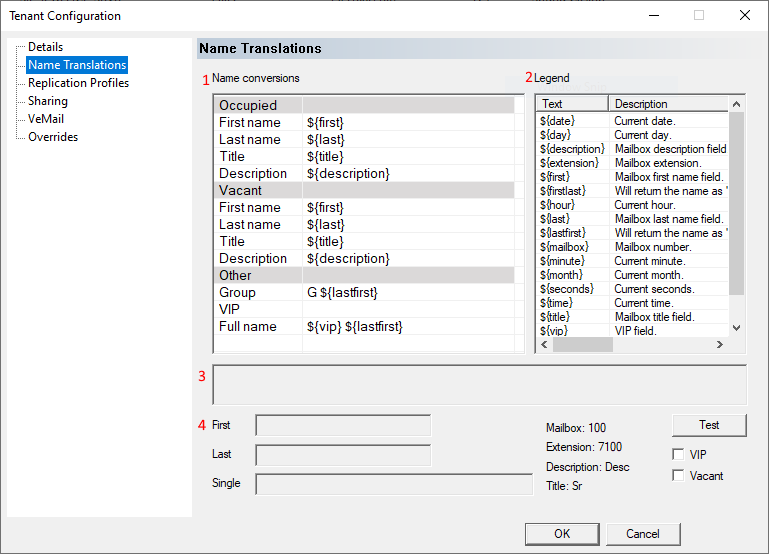
This page is divided into four parts:
The Name conversions table (1) is where you edit how the first and last names, title, and description are formatted, for both occupied and vacant rooms. You can also configure how VIP status is noted (if relevant) and how the full name is formatted (for PBX systems that use a single name field).
The Legend table (2) is a read-only table listing all of the macro codes you can use in the format strings. Macros will be replaced with the correct string from the given room's data at the time the name is being formatted and sent to the PBX. When using a macro in one of the name conversion fields, it must be typed in exactly as shown or it will be treated as raw text to be included as typed in that field.
The box below the name conversion and legend tables (3) displays helpful text describing the selected name conversion field. If no field is selected, this area will be blank.
Finally, the area at the bottom of the dialog (4) is used used to test how the first, last and single name fields will be formatted. The test functions assumes a first name of John, a last name of Doe, a title of Sr., and a description of Desc. The mailbox is assumed to be 100 and the extension, 7100. VIP status can be enabled/disabled using a check box, as can the vacancy status.
Click the Test button to populate the First, Last and Single boxes using these default values and formatting them based on the fields in the Name conversion section.
Editing the Name Conversion Fields
The following name conversion fields can be edited as needed:
| Field | Default | Description |
|---|---|---|
| Occupied / First name | ${first} | How to format the first name for an occupied room; result is sent to the PBX as the first name or is used as the first name when building the Full name field. |
| Occupied / Last name | ${last} | How to format the last name for an occupied room; result is sent to the PBX as the last name or is used as the last name when building the Full name field. |
| Occupied / Title | ${title} | How to format the title for an occupied room; result is sent to the PBX as the title or is used as the title when building the Full name field. |
| Occupied / Description | ${description} | How to format the description for an occupied room; result is stored in the ${description} macro. |
| Vacant / First name | ${first} | How to format the first name for a vacant room; result is sent to the PBX as the first name or is used as the first name when building the Full name field. |
| Vacant / Last name | ${last} | How to format the last name for a vacant room; result is sent to the PBX as the last name or is used as the last name when building the Full name field. |
| Vacant / Title | ${title} | How to format the title for a vacant room; result is sent to the PBX as the title or is used as the title when building the Full name field. |
| Vacant / Description | ${description} | How to format the description for a vacant room; result is stored in the ${description} macro. |
| Other / Group | G ${lastfirst} | Used to modify how the name of a group is set. |
| Other / VIP | (blank) | How to format the VIP flag; result is stored in the ${vip} macro. Left blank by default. |
| Other / Full name | ${vip} ${lastfirst} | How to format the full name; result is used if sending to a PBX that only has a single name field. |
To edit a field (macro), click in the second column as shown below:
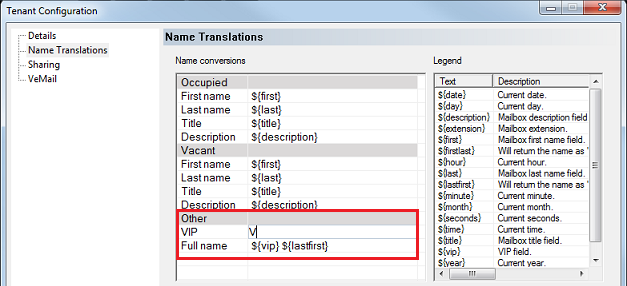
Enter the text and/or macro(s) to use in constructing the selected name component. Any text that is not a macro will be added to the name as-is, whereas macros will be replaced with the configured data. The Legend table on the right lists all valid macros. Macros are entered in the form ${macro-name} as shown above; note that they use curly-braces {} not parentheses.
In the above example, the VIP macro is being set to the letter V. Assuming the other name conversion fields are configured as shown, then if the room is flagged as VIP and is occupied by John Smith, the name sent to the PBX would be V Smith, John. If the room is not flagged as VIP, the name would be sent as just Smith, John.
By default, macros will be replaced with the data noted in the description column of the Legend table. For example, ${first} and ${last} will be replaced with the mailbox first name and last name, respectively. However, when the First name, Last name, Title, Description, and VIP name conversion rules are processed, the results will replace the contents of ${first}, ${last}, ${title}, ${description}, and ${vip} respectively. The Full name field is always built last, using the results of the other five fields when replacing any relevant macros.
Changes to any name conversion fields will be saved only after you click OK.
Testing the Name Conversions
Once you have configured the name conversion fields (or rules), you can verify what will actually sent to the PBX for the first, last, and/or single name fields by using the test controls in the bottom portion of the dialog:
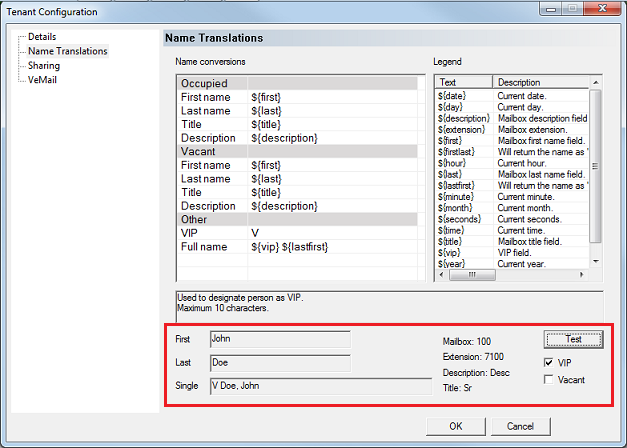
The test area, as highlighted above, has the following controls and fields:
| Field / Control | Description |
|---|---|
| First | Displays the post-conversion first name. The Vacant check box determines which set of conversions are used. |
| Last | Displays the post-conversion last name. The Vacant check box determines which set of conversions are used. |
| Single | Displays the post-conversion full name. The Vacant check box determines which set of conversions are used. |
| Default test data (Mailbox, Extension, Description, Title) | Default hard-coded test values that are used when you click the Test button. Read-only. As shown, the ${extension} macro is initialized to 7100, ${description} is initialized to Desc, and ${title} is initialized to Sr. before the name conversion rules are processed (there is no macro for the mailbox number). Although it is not noted on the dialog, ${first} is initialized to John and ${last} is initialized to Smith. |
| VIP | If checked, the VIP conversion rule will be processed and its result will replace any use of the ${vip} macro in other conversion rules. Otherwise, ${vip} will be ignored. |
| Vacant | If checked, the Vacant conversion rules will be processed. If not checked, the Occupied conversion rules will be processed. |
Check or uncheck VIP and Vacant as desired and then click Test to perform the conversions using the hard-coded test data.
The test feature uses the conversion rules as configured in the dialog even if they have not yet been saved.
Once you are satisfied the conversions are correct, click OK to save them.